Creating a Token on the Sui Network is now easier as the Layer 1 blockchain network continues to evolve into an ecosystem of decentralized applications and digital assets. Created by Mysten Labs and deployed in May 2023 on the mainnet, Sui implements Move language and object-oriented architecture to handle transactions in a way that is quite different from most other blockchain networks.
The network is based on a delegated Proof-of-Stake (DPoS) consensus protocol, which allows horizontal scalability by improving network performance proportionally with the increasing number of validators without affecting its security framework.
All these features, combined with low transaction fees, high processing speed, and developer tools, have made Sui a platform for issuing custom tokens via a graphical interface or via the deployment of Move smart contracts.
The process may differ according to one’s level of technical knowledge, but both of the above-mentioned methods involve some common stages.
Why Develop a Token Using Sui Network?
There are many features available within the Sui Network which makes developing tokens simpler than deploying tokens using blockchain technology.
Some of these features include:
- Very low costs in deploying and transferring tokens.
- Transaction speed through parallel processing.
- Object-oriented asset management for transfer and ownership tracking.
- Ability to develop Move contracts and software development kits.
The above features can enable the developers and the project teams to build the digital assets for various decentralized applications, games, community projects, and blockchain projects.
Token Creation Process in Sui
| Step | Function |
| Set up a wallet | Setup wallet and get SUI tokens |
| Selection of token creation | Select token creation through the Token wizard or Sui command line interface (CLI) |
| Token configuration | Enter token name, token symbol, token supply, decimals, and metadata |
| Token deployment | Deploy the token either to test net or main net |
| Minting tokens | Mint the number of tokens for the initial token supply |
| Verification of token | Verify the balances and contracts |
| Adding Liquidity | Connect to the decentralized exchanges if needed |
| Security of token | Manage security controls and compliance requirements |
How to Create a Token on Sui Network
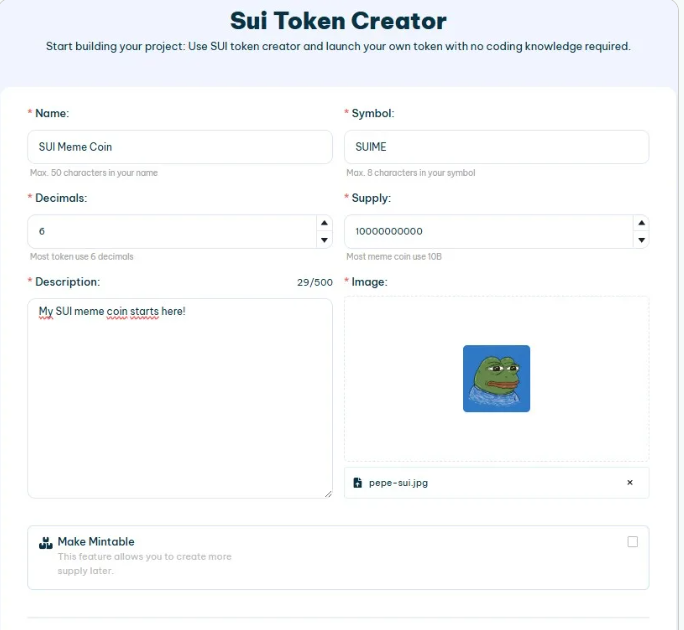
Creation of a Token on Sui Network process may be conducted via browser-based token creation websites or using the Sui Command Line Interface (CLI).
Source: Smithii
Setup of Wallet
Initially, it is necessary to create a wallet suitable for conducting operations within Sui Network. Users may opt for Sui Wallet, Surf or other wallets that work with zkLogin protocol. In case of tests, developers usually change from Mainnet to Devnet or Testnet and get test SUI tokens.
Token Creation Process
There are two methods.
Via the use of token creation websites
Some web platforms offer a graphical interface, making deployment easier.
These tools allow users to enter:
- Token name
- Symbol
- Description
- Logo
- Decimal precision
- Total supply
- Minting permissions
- Freeze settings
Many token wizards also include metadata support, estimated gas fees, and preview screens before deployment.
Sui Command Line Interface (CLI)
Developers opting for manual management can begin by installing the Sui CLI, Git, Rust programming language, and a code editor to create the Move package.
The project layout will include a config folder alongside a source file that will have the smart contract code written using Move.
Token Deployment & Minting
After completing the configuration process, the package will be compiled for error-checking purposes.
After successful compilation, the package can be published to the Sui blockchain. Deployment returns a package ID together with transaction details that identify the deployed smart contract.
Then the mint function is run to create the token supply. Based on how the code is structured, there could be a fixed token supply or future minting capabilities based on certain parameters.
Following the minting, the token should be visible in wallets and explorers, including SuiScan, SuiViews, and MintMeter.
Verify and Add Liquidity for the Token
The verification step ensures that the deployment was successful.
Among the checks that developers perform include:
- Wallet balances
- Total token supply
- Transaction details
- Contract information
- Token transfer success
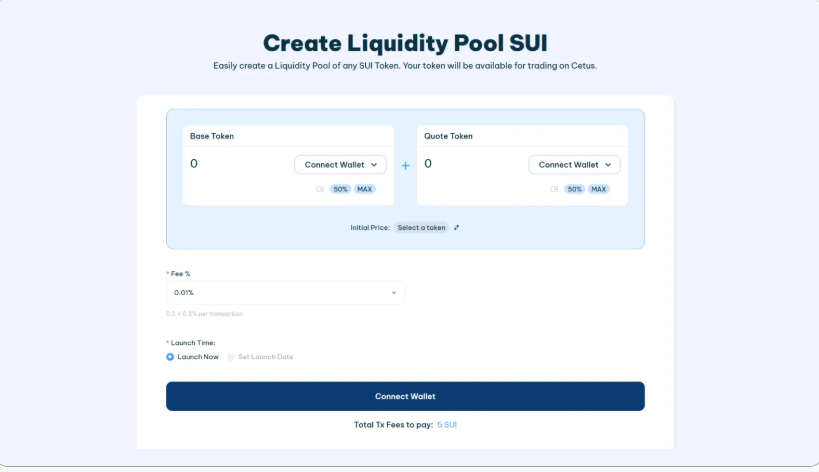
In case of token issuance for trading purposes, the liquidity can be provided by decentralized exchanges that provide liquidity pools for the Sui ecosystem.
Source: Smithii
Such exchanges include Cetus, Turbos Finance, PilotSwap, and SuiSwap. Various token issuance solutions automatically provide liquidity pool links where one can connect wallets, authorize transactions, and add liquidity after deployment.
Security and Compliance Issues
The process of creating a token on Sui Network is not limited only to deployment.
Here are some ways of how projects ensure better security:
- Test contracts on Testnet prior to deploying on Mainnet.
- Analyze Move smart contracts for bugs.
- Ensure minting and burning permissions through multi-sig functionality.
- Store recovery phrases of wallets securely.
- Provide sources of contracts along with audits.
Legal disclosures might be necessary in addition to this, and depending upon the purpose of the tokens and regional requirements, KYC/AML checks will be required for more substantial projects.
Common Mistakes to Avoid
There are some mistakes that usually happen while generating tokens.
They are:
- Not deploying testnet before deployment on Mainnet.
- Using old versions of Sui CLI.
- Not saving package ID after deployment.
- Setting wrong permissions for minting.
- Wallet Credentials Loss.
Stage-by-stage testing before implementation will allow detecting configuration errors prior to the start of interaction with the token.
Conclusion
How to Create a Token on Sui Network is a combination of user-oriented deployment solutions and a developer-oriented environment based on the Move programming language. The token can be launched via the graphical token wizard or smart contracts created via the Sui CLI, depending on technical skills of the user. After the process of the token deployment, verification of the contract, liquidity provision, and implementation of the security mechanisms become critical steps in the management of the token.
Frequently Asked Questions
Which programming language is used by Sui for token creation?
The move programming language is used for token development.
Can a novice deploy tokens on Sui?
Yes, the process of token deployment can be done using browsers with no coding in the Move language.
Is there any need to conduct tests for the token deployment?
Yes, it is advisable to test the token on Devnet or Testnet before deployment to prevent any errors while deploying or configuring the tokens.
Where can the deployed token of Sui be verified?
Token deployment can be verified through various blockchain explorers such as SuiScan, SuiViews, and MintMeter.